-
Adult Employment Vacancies
For some the prospect of being able to work for another company online is something that they may ultimately want to pursue however, just how do you go about finding work for one of the many adult companies and, more importantly, how can you ensure that you have a better chance of being hired for the job once you find the position you would like to have at the company?
Online Adult Employment – Job Types.
Working in the adult industry can take many forms however, the most commonly perceived adult industry job is that of a model but, what about other online job vacancies such as graphics designer, marketing manager, sales director, and webmaster support representative, just how do you find out what companies are hiring and more importantly, what adult employment vacancies they have.Adult Employment Agencies.
For many webmasters the chances of finding employment in the adult industry at a ‘regular’ online employment agency such as monster.com may seem impossible however, that said, many of the larger companies have realized the value of the mainstream employment agencies and, as such are now advertising on these sites for their staff but where else can you look? Well there are actually several adult industry employment sites that adult webmasters can look at to find their ideal job for example Adult Staffing, Sexy Jobs and, Adult Help Wanted in addition to several smaller sites operated by companies such as Cybererotica.Improving Your Employment Chances.
So now you know where to look for adult employment opportunities what can you do to ensure you have a greater chance of being hired? Well as with the mainstream bricks and mortar job market having a good curriculum vitae (CV) can be a good start, ensure you keep your CV regularly updated and that it contains pertinent information for the type of job vacancy you are looking for in addition, often the first method of contact you will make with these potential employers will be via email or cover letter, make sure that you spend some time to write a letter that is not only noticeable but, interesting and, more importantly, grammatically correct. Demonstrate in this first stage of contact with your potential future adult employer that you take pride in your work and, you might just get bumped to the top of the ‘must see’ applicants.Adult Jobs – Overview.
Many webmasters forget that there is more to the online adult industry than being able to party with the best of us and, whilst this does form a chunk of the industry overall it is not conducive of you further enhancing your online career, take the time to investigate all of the avenues available to you and, most importantly, make sure you choose a job that you not only want to do but one that you will enjoy, your reputation is the one thing that a potential adult employer will take into consideration, if you have had several previous jobs all lasting for short periods of time, it wont look as good to them as if you have only had a couple of jobs for a lengthier time frame. Most of all remember that whenever you contact a company looking for employers, make sure you are prepared and professional even if it is just sending them a quick email asking for further information.Article written by Lee.
-
SEO Pyramid Scheme
I thought i would spend a little time to let you guys in on a little something i like to call the SEO Pyramid Scheme
Basically, we all know the importance of targeting specific keywords and phrases however, this isn’t necessarily the easiest of things to do until now…
Lets take a simple free site as our example, We know we have to have Meta Tags, Descriptions, Alt Texts and Body text on our site but how do we keep this all in within the theme of our site and, more importantly, how do we make sure we target as much of our niche traffic as needed? Actually the process itself is a simple one that has been around for many years however, very few people make good use of it.
So we have our free site all ready and waiting to be optimized for the search engines the first thing we need to do is take a look at our sites content (read as images) and make a short mental description of them so for example, if we have a teen site the pictures may be of a ‘blonde sexy teen model wearing stockings’.
That description is the basis for our keyword pyramid.
We now have to construct our pyramid based on that brief description so we start o break it down word by word for example:
Blonde
Sexy
Teen
Model
StockingsThat is our primary layer in the pyramid already completed, not so hard really was it
Now comes our second level in our SEO pyramid:
Blonde Sexy
Sexy Teen
Teen Model
Model StockingsAs you can see from this we now have our secondary layer of the pyramid all worked out onto our tertiary layer:
Blonde Sexy Teen
Sexy Teen Model
Teen Model StockingsNow we have our tertiary layer for our pyramid we can continue this for further layer like this:
Blonde Sexy Teen Model
Sexy Teen Model StockingsAgain, we can break this down one more level like this:
Blonde Sexy Teen Model Stockings
We now have 5 layers to our pyramid.
The next stage is to incorporate these layers into both your Meta Tags and, more importantly you body text.
Take each layer in turn and, where possible include one line from each later into each portion of our HTML code from the Meta Tags, Alt Tags, Main Body Text, Hyperlink Text and, Image File Names.
By working through each layer of this SEO pyramid at a time you will not only discover keyword rich phrases that you could otherwise be missing out on in the search engines but, you will give your sites a theme making your chances of being listed for the correct search terms even better.
Article written by Le
-
European Surfers – Porn High On The List!
Adult web sites were visited by 3.8 million home Internet users in the UK in June 2001, according to Internet monitoring company Net Value. This accounts for more than a quarter of the entire UK home Internet population.
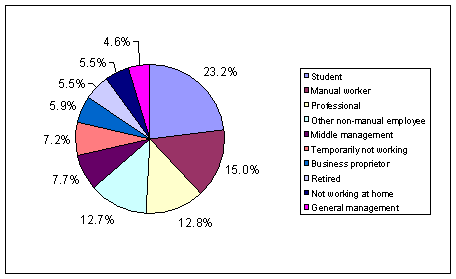
UK visitors to adult websites spent more than 45 minutes on these sites each in June. Adult sites make up 41.2 per cent of all the sites visited in the UK with a significant audience. Students (23.2 per cent), manual workers (15 per cent), and professionals (12.8 per cent) are the largest groups of UK visitors to adult sites.
However Germany has the largest audience for online porn in Europe with more than 5.3 million Germans visiting an adult site in June. They also spent more time on these type of sites than any other nationality – each German visitor spent almost an hour on adult sites in June. Net Value data also showed that more than half (52.3 per cent) the websites visited in June by a significant number of German users were of an adult orientated nature.
Spain has the greatest proportion of visitors to pornographic sites – 40 per cent of Spanish home Internet users visiting a pornography site in June 2001.
“Pornography has become a lucrative online business, with many companies now recognizing it as a valuable additional revenue stream,” Net Value’s Alki Manias said. “And this would seem to be a stable business area – the popularity of online pornography continues unchecked.”
Adult sites are also popular amongst the earliest adopters of the Internet. People who first got online at home before 1997 account for 18.5 per cent of visitors to adult sites, though they only make up 14.1 per cent of the whole UK online population.
In the UK, Lastminute.com has just introduced an auction for adult toys and aids, whilst in Germany, Freenet.de and T-Online are also moving into the adult business.
The following charts detail various demographics relating to European surfers usage of adult sites:
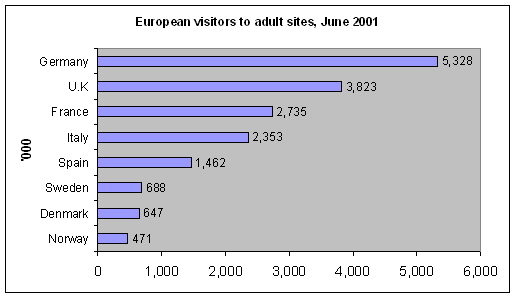
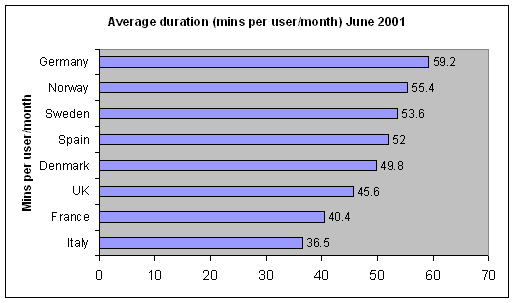
Number of adult websites visited, June 2001
Number of adult websites visited Total number of Websites visited* % of websites which have adult content Germany 4,140 7,909 52.3 Norway 3,847 7,756 49.6 Denmark 3,675 7,661 48.0 Italy 3,131 6,579 47.6 Sweden 2,419 5,231 46.2 Spain 3,069 7,019 43.7 UK 3,879 9,411 41.2 France 4,348 11,845 36.7 * Sites with a significant reach
UK visitors to adult websites by occupation, June 2001
As you can now see, we, as adult webmasters, have a considerable chunk of the online adult industry sitting in our laps and, we should concentrate on tapping into this market as more and more American companies are realizing the importance of these figures we will inevitably reach a stage where the European market will be passed across to our US counterparts.
-
Why Go Adult?
When choosing a hosting company why choose an adult host over a mainstream one?
Simple, They provide above other things, a better quality of service, affordability and, most importantly, reliability.
Adult hosts face a variety of technical and support issues, this coupled with the points mentioned above makes them a far superior choice to standard mainstream hosting providers. This is one of the main factors why more and more mainstream internet based companies are now turning to the adult business forum to provide their hosting solutions.
Mainstream going adult? Yes that’s right, more and more mainstream companies are turning to our industries hosting providers for the fast speeds, security and, reliable infrastructures they can offer after all, adult sites are amongst the most prolific on the internet on average gaining more daily hits to their sites than mainstream websites so, they need to be cost efficient, not only to the hosting companies but, also to their clients, the webmaster.
Our industry strives on the use of heavy graphics, coupled with streaming media files to secure sales and longevity, this is why the adult hosting companies need to be able to provide not just a single, heavily laden server but tens of them, sometimes even hundreds all producing gigabytes of traffic on a daily basis.
Adult hosting companies are constantly upgrading their equipment in order to improve not just their servers, connectivity but also the smaller things that are often overlooked by webmasters, hubs, routers, switches and the likes along side the not so technical aspects of running a host, The staff.
Along with all of this technical equipment they also need to maintain a high level of technical knowledge, after all, not just anyone can install operating systems capable of running multi-million dollar industries. They need the knowledge to maintain, upgrade, repair and sell their services to the best of their capabilities.
What does this mean to you? Well, we all want to make money and, through the use of faster servers, e-commerce solutions and the technical support your hosting provider can give you, you will be fattening your wallet on a daily, weekly, monthly basis.
Adult hosting, quite simply, is the crème de la crème of the hosting world, they offer solid, solutions whether you are starting in the adult industry or, operate a mainstream e-commerce site.
So how do you choose a host that is right for you?
You need to ask some basic questions of the host and, do your homework. Not only should you find out what hosting solutions they can offer you but, you need to find out what their support service is like, how affordable they are in comparison to other companies who can offer similar or the same service. Whilst on the subject of hosting support, before you sign on the dotted line, give your host a call out of office hours, if they answer, then you can almost be certain they are a good hosting provider.
Of course, not all hosts will have 24 hour phone support, however, that said, some offer 24 hour icq support, email support and more.
Another sure fire way to find out if a hosting company is any good is to ask on the heavily traveled webmaster message boards, after all, you are not the only webmaster out there who will have tried this company, if they are no good, someone will know about it and point you in the direction of a reputable host like http://www.webair.com.
Hopefully, this article will have given you some insight into the world of adult hosting companies and, will assist you in making the right choice of host for your site, whatever type of website you might be hosting.
Article Written By Lee
-
Now They Signed Up – Learn How To Keep Them
Member retention is going to have a large effect on the adult industry over the next few months, with Visa chargeback rates being lowered and, many affiliate programs lowering their payout model something has to give and, hopefully, the thing that does give will be that affiliate programs start to realize that once they have your surfer, it becomes their responsibility to make that member retain.
With that in mind this article will look at a few things that we have been doing on some of our paysites for the last few months and, instead of having to provide an excess of plug in content we have started updating our sites regularly within the niche confines of what our members are actually looking for, also, despite this increase in content, we have started doing something unique so far as member retention goes – actually communicating with the member directly.
Communication Pays.
Actually spending the time to listen to what your members want can be beneficial on many levels for example, how many of the big sponsors offer the member a chance to become involved in a ‘community’ inside their paysites, i can only think of 3 paysites that i have personally visited that do this.Often, offering your members a way to communicate to YOU what they want inside the site can, and usually will increase the value of their membership to you in the long run. offer your members weekly polls, offer them incentives to keep an active membership, perhaps some kind of loyalty program, in addition to a method of your paysite members being able to communicate to each other inside your site.
Content Updates.
We all know that paysites need to update however, how many paysite owners spend the time to ask their member what they are looking for? As mention in the previous section, offer your members polls on the next updates you will be doing, ask them what sections of the site need improving and, more importantly, ask them if they are happy with how your site looks and feels overall.Renewal Time.
So you have managed to keep hold of your paysite member for a few days without them canceling and, their trial period is ending what now? Well, more often than not, communicating to the member that they are about to get rebilled can have a positive effect, send them an email prior to the rebill informing them of what your next set of updates will be, let them know they are a valued member of the site and, more importantly than this, that you are there to help them and listen to their suggestions. This is also an ideal time to remind them of why they joined your site in the first place, you have a lot of exclusive content that, simply put, no other paysite can offer them, you listen to their feedback and, again, value their feedback, all of these things will ensure that your member base retains well over the trial period.Second Month Renewals.
So you have managed to keep your member for a month, and, again they are due a rebill, as with the first rebill you gave them, re-iterate the points of your site and, tell them what has changed over the past month, give them some sales speak about how your site is doing and, more importantly, what you have coming next month, by communicating these updates to your members a day or so before they have to renew, you should, in all honesty, keep their interest in your paysite and, more importantly, make more money from your members.So Your Member Cancels.
Okay, so perhaps you managed to rebill your member for a few month or, perhaps they left after the trial period, what now? Simple, send them a follow up email, find out the reasons they cancelled their membership to your site and, see if you can offer them an alternative to stay, perhaps a reduced cost membership or, maybe even an alternative site altogether, if they entered your teen pay site and, were looking for amateur teen pics, even though you know you don’t have them yet, you will probably know of a site that does, tell this cancelled membership about this site and, get them to try it out, if you can match what the surfer is looking for to a site you own then you have a second chance at keeping their membership and, making money.Retention Overview.
When all is said and done the one thing that is apparent so far as pay sites go is that a lot of them do not communicate with their members and build the sites they operate around what their members are looking for, we can all say we actually do this constantly but, how many of us really, hand on heart, can prove that they ask, listen and, more importantly, implement the feedback from their members base?Article written by Lee
-
GEO::IP – What Is It?
As more and more webmasters investigate the international market place to expand their online businesses I thought it would be prudent to take a look at one of the more important modules of Apache and, just how this module can help webmasters to monetize their international traffic. What is this module? GEO::IP.
Geo I.p – The Basics.
GEO::IP is an Apache module which is able to recognize countries by specific I.P blocks. GEO::IP in itself is, in effect a database of the current i.p addresses in use on the internet across the globe. When used in conjunction with various scripting languages, Perl, Php, Etc the Apache GEO::IP module can assist online businesses with the following:Detecting credit card fraud.
Automatically select the geographically closest mirror.
Analyzing your web server logs to determine the countries of your visitors.What this means to the webmaster is that they can now market their sites to a specific language or, country in addition to either redirecting or, refusing other countries / languages access to their online sites.
GEO::IP Module – Where To Find It.
The GEO::IP module is available from several sources online in either paid or, free forms. The most up-to-date and professional form of the GEO::IP module can be found on the Maxmind website ( http://www.maxmind.com ).Once you have the GEO::IP module you should either ask your host to, or, install it yourself on your Apache based web server.
Geo I.p – Different Modules.
In addition to the simplistic ‘country i.p’ based detection, there is also another more complex GEO::IP module, this module is often referred to as ‘I.p to Location’ which, in simplistic terms means that you can target specific cities of the world hence, if you want to offer a service to surfers in Miami, you are able to redirect your Miami surfers to a page with content of specific interest to them.Redirecting Traffic.
Geo i.p is the basis behind most of the international traffic redirection systems available for webmasters to use in order to monetize their global traffic more efficiently, whether those systems are paid, free, subscription based or, otherwise they will ALL use the fundamental basics of the GEO::IP module.Through the use of the geoip module you will be able to maximize and filter the traffic sources you currently have and, decide on whether you send your surfers to a Pay site, a dialer or, a traffic trade.
Scripting – Putting GEO::IP To Work.
Many programming firms are now looking at the global market place in addition to webmasters as they now have the ability to offer their clients a wider product base from country specific banner displays to multi-lingual tours, programmers can develop new ways to enable webmasters to profit from their traffic unlike ever before. One such company is Geo Scripting ( http://www.geoscripting.com ).GEO::IP – Overview.
All in all the Geo i.p Apache module is going to become more and more prominent in the industry, sponsors are already starting to use country specific redirects on their affiliates traffic base and, individual webmasters are beginning to capitalize on this module through redirecting their own traffic to the sponsors that offer them multi-lingual paysites. When all is said and done, I am all for anything that can better assist webmasters in monetizing their global revenue streams especially as in the last 4 years I have been online it would only seem to be the last 2 months when this untapped source of income has come into the forefront of the adult industry.Article written by Le
-
Networking – Not Just For Computers
Networking – Not Just For Computers.
“Networking” is a buzz word today. Everybody talks about it. Everybody hears about it. Everybody wants to do it more effectively. But why? Why do people network, and what do they hope to accomplish?Primarily, networking is the process of meeting new people, either through a contact that you initiate, or through an introduction by a third party.
Networking allows you to meet, and establish a relationship with, people who may not have heard of you and your business through any other method.
For most professionals, networking is done to increase revenues. Sometimes new clients are found, sometimes suppliers and, sometimes new ways of doing things that increase your bottom line are found through networking.
When networking you should work towards these common goals:
To exchange business ideas.
To get better service.
To develop your business skills.
To potentially increase your revenues.
To establish long term friendships.This means that networking is an essential part of building up strong business relationships. We need each other to buy from us, sell to us and, brainstorm with us in order to progress in our fields. In order for us to do these things we must give something back in return, its all about give and take.
we must be willing to hone our relationship building skills. We must be great listeners. We must be willing to give before we receive. We must get into networking mode in our own minds before we ask the same of others. This must be constant.
Through consistent contact with others, you will, instinctively start to put 2 and 2 together. When you begin speaking with someone your mind will automatically start searching the inner most recesses of your brain to remember people, places, even products, that will assist the person you are networking for and, at the same time, you will also be thinking of what they can do for you in return.
This Is Networking.
This is the state of mind you should be in whenever you are talking to someone in your industry, to get your mind in this state takes a while but, once you have focus and determination, you will immediately see how you can help others and, how they can benefit you in return whilst listening to them. this is the first step in getting them to help you.Networking, as its name would suggest is WORK, hard work, the process is also a learned skill, its not something that we are all born with or, can all do. It can often be frustrating when you have a goal in mind but, your networking functions are not achieving that goal. All in all, networking is the building block of many a business venture, it can make and it can break you. Take some time to consider this fact the next time you are posting on a board or go to one of the tradeshows, you might just come away with more than you hoped for.
Article Written By Lee
-
What Happens Your Current Processor Bails?
Whilst this is perhaps one of the hardest challenges that a webmaster of a paysite can face in the industry it isn’t as bad as they may seem at first after all, there are literally hundreds of processors to choose from ranging from credit card processors, dialer option, micro-sms billing and a wide range of other systems.
The first and foremost thing you should do however when confronted with this challenge is to try and contact your existing processor and find out what will happen to funds that you are owed, will you be paid (in most cases you will).
The next thing you should do is to evaluate your business billing methods are you offering multiple processors already? If so, simply switch to your backup processor and find a new processor to use as a backup.
However, what happens if you only have a single processor on your site what can you do then?
First things first, you need to make sure you choose a reliable payment processor to start off with companies such as iBill, CCBill, CCBill EU, Netbilling and Jettis are all good processors used by a multitude of sponsors and content providers amongst the other companies.
You will most likely find that these companies are more than happy to work with you in the integration of their system onto your site.
Whilst you are awaiting your setup of your new processor to ensure you do not lose any sales it may be an idea to divert your join page off to a dialer or, perhaps have some form of ‘internal’ billing mechanism set up so that, when you do change over processors you can seamlessly transition your member base across.
Now, presuming that you already have an existing member base what do you do then? How easy or hard is it going to be to transfer them across to your new processor? Well based on the situation some were confronted with when Visa introduced the new fees to process adult payments this can vary from webmaster to webmaster again, as before, the easiest solution for you would be to contact the company you will be using as your primary processor and see what they can suggest.
Hopefully, you will have access to a database of your existing members email addresses this will also come in handy to ensure you can keep recurring those members. Send out an email stating that you will be changing your processor and, ask that, if they would like to remain a member of your site that they update their billing information, it might also be prudent to offer them some sort of recompense for having them change processors perhaps something along the lines of 2 weeks low cost or even free access tot he site, this is sure to mean that most of, if not all of your existing members will input their billing information again enabling you to rebill them until they cancel their membership at our new processor.
Of course nothing is infallible so the best advice i can offer you is to work closely with your new found processor and make sure that the transition period happens as quickly and, as smoothly as possible.
Hopefully this article will be of some use to those who do get affected by their processors going out of business and, will also serve as a warning to have multiple processors in place for those who have not or will not have the need to change your billing company.
Article written by Lee
-
Converting French Traffic – The Niche Paysites That Work
In our last article we took a look at a three (3) month period of international traffic stats and, what niches worked on German adult traffic. In this article we will do the same again except we will be analyzing what niche paysites worked best on French porn surfers.
French Traffic – Quick Analysis.
It would seem that for many of the surfers we managed to grab and filter from France that their primary interest was in Teen and the Amateur niches although, that said, we did get a few conversion on some fetish paysites, specifically fetish sites that had ‘watersports’ and ‘BDSM’ featured on the paysites tour pages.French Adult Traffic – The Niches.
As with the German traffic we targeted in the previous article we also filtered our French adult traffic to some niche specific hub sites as well as some general hub sites to better judge which niches converted the best on French surfers the results we experienced are as follows.Teen.
Our conversions on French teen sites were not as good as what they were for German surfers however, that said, they were good non the less. With a ratio of around 1:192 over the three month period we analyzed the French adult surfers we managed to get to our sponsors sites worked well for us.Amateur.
With our amateur conversions the one thing we noticed was that tours that featured teens as the main focus were the ones which converted consistently, with this in mind, we did change a couple of the Amateur tours we used to see how that would affect sales towards the end of the 3 month period and, sales did drop slightly, this would backup the statements in the Teen niche made above in that, French surfers are looking primarily for Teen orientated paysites.Asian.
The two Asian niche paysites we used didn’t have many sales overall however, we did notice that the little traffic that we sent to them converted well, as above, Asian niche sites that featured teens were again the better converters on the French traffic we received.Ebony.
I think it is worth mentioning the ebony niche, especially when you take into account we sent less than 100 hits to French ebony paysites and, managed to get 2 sales from those hits. Unfortunately, we did not anticipate the amount of traffic that wouldn’t choose the ebony niche so we have no solid figures that are worth mentioning here or, any explanation behind how we made the sales.Fetish.
Our French fetish traffic seemed to like the more niche specific type of tours, making us sales on Watersports, BDSM and even general fetish paysites that said, the figures we achieved with the fetish pay sites we used were disappointing as we had thought this would be the ideal niche for the French markets.Gay.
The sales we achieved with our gay French traffic were reasonable overall, the surfers chose to signup to gay sites that featured ‘twink’ like models on the tours again, this would lend favor to the fact that overall French surfers seem to be interested in the younger generation to get their kicks.French Traffic – The Results.
Overall we were happy with the majority of the results we received on our French adult traffic with the exception of a few bad choices on our part trying to concentrate on the Fetish side of the industry. We certainly learnt that it would appear French adult surfers are looking for Teen orientated sites over the other niches.Article written by Lee
-
Adult Hosting Glossary
Adult Hosting Glossary.
With so many adult hosting companies looking for our business all of them telling us we need a variety of applications and software packages to run our sites, just how do you know what you do need and, more importantly, what you don’t?
Below you will find a list of a variety of common terms used in relation to hosting your website and, hopefully, you will in turn, discover what your requirements are when looking for a new or alternate hosting company.
Alias
A name that points to another name. Aliases are used to make the original name easier to remember or to protect the site’s identity.Applet
An applet is an embedded program on a web site. Applets are usually written in the coding language called Java. They are normally used for creating a virtual object that may move or interact with the web site. An applet is like a small piece of executable code that needs a full application to run it.Active Server Pages (ASP)
Active Server Pages allow web developers to make their sites dynamic with database driven content. The code is mainly written in VB Script, and it is produced on the server of the web site instead of the browser of your web site visitors. The server reads the ASP code and then translates it to HTML.Audio Streaming
The process of providing audio content on a web site. This takes up a large amount of bandwidth, especially if you get a lot of visitors at your site. Some hosts do not allow audio or video streaming because of this.Auto Responder
An automated program that acknowledges receipt of an e-mail message, and then sends back a previously prepared email to the sender, letting them know it was received. Once you configure your auto responder, it sends e-mail with no further action required on your part, making your web site interactive around the clock. Most hosting companies let you set this up through their control panel.Availability (Uptime)
Refers to the amount of time within a 24 hour period a system is active or available for servicing requests. For example, if a hosting company says it is available 99.9% of the time, they are claiming that your web site will up all the time except for about 8 seconds each day. Over the course of a year, in this example, the hosting company is claiming that your site will only be unavailable (couldn’t surf to it) for 48 hours.Backbone
A high-speed line or series of connections that forms a major pathway within a network. The term is relative as a backbone in a small network will likely be much smaller than many non-backbone lines in a large network. In general, the better the backbone of the hosting company, the better the availability of the web sites that run on their computers.Backups
Web hosts back up data on their servers. Many host packages offer backups every 24 hours. This is supposed to prevent the loss of data should something happen to the server. . If you think you may need to restore old data in case of a disaster, it may make sense to choose a hosting company that performs regular backups.Browser
This is the client software that displays (interprets) the HTML code it receives from the server. All browsers work slightly different and one may not display the pages correctly if the code was developed exclusively for another browser. Today the two main browsers are Microsoft Internet Explorer and Netscape.C +/++
C+ and C++ are programming languages. Some hosting companies provide access to C+ and C++ class libraries if your web site contains these types of program modules. Once your web site has been constructed, you will know whether access to C+ or C++ will be required.CGI (Common Gateway Interface)
A CGI is a program that translates data from a web server and then displays that data on a web page or in an email. CGI involves the transfer of data between a server and a CGI program (called a script). This allows HTML pages to interact with other programming applications. These scripts make web pages interactive. Page counters, forms, guest books, random text/images and other features can be driven by CGI scripts. Some servers have pre-installed/pre-defined CGI scripts, meaning that the scripts are already installed on the server for you to use on your site. Some servers permit user-defined or custom CGI scripts, which means the site owner creates his/her own CGI script and runs this custom made script on the web site. Not all servers allow user-defined (custom) scripts for security reasons. Almost all hosting companies offer CGI today. If you think you will need forms on your web site, CGI could be a key requirement.Chat Server / Software
Some hosting companies allow you to develop a chat room or other type of chat service for your visitors. Be sure to check with the web host company about the details of the chat services offered. Some servers permit you to configure the service, and others pre-configure everything for you while others do not allow chat rooms at all.Click Through
This term is used to describe the ratio of clicks to impressions on an advertisement, usually a banner ad. If a banner has been shown 100 times and 3 people click on it, it will have a 3% click through ratio.ColdFusion
An application which simplifies database queries by allowing for a simpler programming language to handle functions between the user’s browser, the server, and the database. After you have developed your web site, you will know whether ColdFusion is a requirement. If you have not used ColdFusion to develop your site, you should ignore this feature.Co-Location
Co-location means housing a web server that you own in the facilities of a hosting provider. This option is perfect if you want to own your own server, but do not want the hassle or security risk of maintaining that server.Control Panel
An online package of tools permitting easy site management and editing. Almost all hosting companies provide this option today. It is a very important feature to have. By having your own control panel, you can maintain basic information about your site, mail boxes, etc. without having to send emails to the hosting company or call them on the phone.Cookie
A message given to a Web browser by a Web server. The browser stores the message in a text file called cookie.txt. The message is then sent back to the server each time the browser requests a page from the server. The main purpose of cookies is to identify users and possibly prepare customized Web pages for them. When you enter a Web site using cookies, you may be asked to fill out a form providing such information as your name and interests. This information is packaged into a cookie and sent to your Web browser which stores it for later use. The next time you go to the same Web site, your browser will send the cookie to the Web server. The server can use this information to present you with custom Web pages. So, for example, instead of seeing just a generic welcome page you might see a welcome page with your name on it.Credit Card Billing
What is a merchant account? Why do I need one? A merchant account gives a business the ability to accept credit cards as payment for the company’s goods and services. It provides your customers with an extremely popular payment option, beyond cash and checks. This is usually done via a 3rd party provider such as Ibill.CSS (Cascading Style Sheets)
Used to add more functionality to simple HTML pages. Internet Explorer 3.0 and up support a good portion of CSS, while Netscape 4.0 and up supports a small amount of CSS – a fully compliant browser does not exist yet.Database Support
If your web site will leverage a database to store information, database support by the hosting company will be required. After you have developed your web site, you will know which database will be required. Some commonly used database programs are SQL Server, MySQL, Access, Oracle, and FoxPro. Databases can be difficult to configure properly. Before you sign up with a web host, first inquire if the host can support your database needs.Data Transfer
This is the amount of data that is transferred from an account as visitors view the pages of the web site. If you have a web site with lots of video, audio, and images that gets many visitors per day, you would have to make sure that you choose a host that will allow large amounts of data to be transferred. If you choose a host that only allows 200 MB of data transfer per month, and your site transferred 500 MB per month, then the host may stop half of your visitors from viewing your site and you could lose potential customers. Your best bet is to try to find a host that offers unlimited data transfer or at least a Gig of transfer. A gig is more than enough for most web sites. As a general rule, 500 MB of data transfer is equivalent to 20,000 page views.Dedicated Server
A more expensive type of account in which the web hosting company provides you with an entire hosting setup including your own server hardware that only you can use. This usually means a much faster loading time for your site because the entire computer is “dedicated” to running the server software. This is different from most other hosting accounts in which your web site will share space on a server with many other web sites, called a virtual server. A dedicated server makes sense for web sites that require higher availability and higher data transfer rates.Disk Space
This indicates the amount of disk space that will be available to you on the hosts server to hold your web site files. Normally because HTML files are small, a web site (unless it has extensive graphics or database functionality) will be small, as low as 1 or 2 MB in most cases.Domain Parking
Many hosting companies give you the option to ‘park’ your domain name without actually having your web site up and running. This is a nice option if you want to acquire a domain name for your web site well ahead of having the web site itself designed and constructed.Domain Name
The unique name that identifies an Internet site. Domain Names always have 2 or more parts, separated by dots. The part on the left is the most specific, and the part on the right is the most general (adult-hosting-companies.com). Technically, the domain name is a name that identifies an IP address. To most of us, it simply means www.yourname.com. Because the Internet is based on IP addresses, not domain names, web servers depend on a Domain Name System (DNS) to translate domain names into IP addresses. Simply stated, domain names allow people to find your web site by name rather than by its numerical (IP) address.Domain Name Registration
Often a hosting company will offer to register your domain name at the time you sign up for a hosting plan. This normally incurs an additional charge but may be cheaper and more convenient than using a separate domain name registration service. We recommend that you go ahead and register your domain name as soon as possible, especially if you think it will take some time to develop the site itself.Domain Name System (DNS)
A model for tracking other machines (that contain web sites) and their numeric IP addresses. Translates domain names (for example, www.adult-hosting-companies.com into a numerical IP address). When a computer is referred to by name, a domain name server puts that name into the numeric IP address assigned to that computer. So when you buy a domain, say www.yourname.com, it does not become accessible until it gets assigned an IP address from a hosting company. Once the IP address is assigned, a cross-reference record (DNS record) is created that points your domain name to the numeric IP address.Email POP Account
POP (Post Office Protocol) is an actual e-mail account on your web host’s e-mail server. Think of each POP account as a unique email address ([email protected], [email protected], etc.) Before you choose a specific hosting plan, you should know exactly how many email accounts are required to meet your specific needs.FrontPage (Microsoft)
Front Page is an HTML editor made by Microsoft. It is commonly used to create web sitesFrontpage Extensions
Frontpage extensions can be thought of as “mini programs” that allow features of a web site created with MS Front Page to operate smoothly. It is possible to use MS Front Page to create a web site and host that site on a server that doesn’t offer FP extensions, however some of the powerful features of the program cannot be used in these web sites. See Microsoft’s Front Page site for more information. After you design your web site, you will know whether FrontPage extensions will be a requirement.File Transfer Protocol (FTP)
A way of transferring files (uploading and downloading) across the Internet. Most web sites are uploaded to the Internet by means of an FTP program. This is how the web site you create on your computer at home is transferred (uploaded) to the Internet. Some software, such as Microsoft Front Page, does not require use of an FTP program but the use of most any other HTML editor requites the use of and FTP Program. There is a free FTP program called WS_FTP and you can download it at download.com. There are many Internet sites that have established publicly accessible repositories of material that can be obtained using FTP, by logging in using the account name anonymous, thus these sites are called anonymous FTP servers.Host (Name Server)
When you hear the term “host” in the Internet world, it is referring to an Internet company that has the required servers and software to connect domain names to (IP) Internet Protocol numbers so that your site can be viewed by the public when they type your domain in their browser window. Basically this is where you house your site, and you usually have to pay a monthly or annual fee for this service.Host Country
Specifies which country the hosting company resides. The internet is a very complex web of server computers connected through telecommunications devices. In general, it is best to host your web site in a location closest to the users that access it. For example, if you plan to deploy a web site that will attract mostly German visitors, it may makes sense to choose a hosting company located in Germany.Host Platform
This is the platform of the hosting providers servers. Hosting companies will typically having a hosting platform based upon Windows 2000 (Win2K), Windows NT or Linux. If you have a basic web site that does not make use of server side applications such as a database then you do not need to worry which platform is used.Hypertext Markup Language (HTML)
Stands for Hyper Text Markup Language. This is the code that web pages are written in and the browser interprets to turn into the web page you view on the screen.Hypertext Transport Protocol (HTTP)
The protocol for transferring hypertext files across the Internet. Requires a HTTP client program on one end, and an HTTP server program on the other end. HTTP is the most important protocol used in the World Wide Web (WWW). You see it every time you type a web site in your browser http://…IP Address
A unique number used to specify hosts and networks. Internet Protocol (IP) numbers are used for identifying machines that are connected to the Internet. They are sometimes called a dotted quad and are unique numbers consisting of 4 parts separated by dots, They would look something like this 111.222.333.444 Every machine that is on the Internet has a unique IP number – if a machine does not have an IP number, it is not really on the Internet. Most machines also have one or more Domain Names that are easier for people to remember.Internet Service Provider (ISP)
A company or institution that provides access to the Internet in some form, usually for money. They will usually allow users to dial up through a modem, DSL, or cable connection to view the information on the Internet Access is via SLIP, PPP, or TCP/IP. Picking your ISP is an important decision but has more to do with how you access the Internet rather than which host you choose.JavaScript
A scripting language which enables web designers to add dynamic, interactive elements to a web site.Java Servlets
A servlet is an application or a script that is written in Java and executed on a server, as opposed to on a client. It is analogous to CGI, although servlets are more than simply CGI scripts written in Java.Mailing List Software
A mailing list is a discussion group based on the e-mail system. You may want to set one up – they’re very useful promotional tools. Even if you don’t want to host a discussion group, you can use a mailing-list program to distribute a newsletter similar to http://www.adultwebmasternewsletter.com. Many companies have mailing-list software available for their clients to use — if so, ask whether there’s an additional cost, how many mailing lists you are allowed to have, and how many members per listODBC Sources
Open Database Connectivity (ODBC) is a generic way for applications to speak to a database. ODBC acts as an interpreter between an application (say a Cold Fusion or ASP application) and a database (like Microsoft Access). By using ODBC, a connector can be created that will allow a web application that you create to read data from and insert data into an Access database that you’ve created. An ODBC source is a directory entry that specifies database information. This ODBC source (or DSN Source) allows your site to point to the correct database located on the web server.It is possible to connect to a db without ODBC, but it is a safe bet to assume you need 1 ODBC connection per individual database you will have.
Perl (Practical Extraction and Report Language)
Perl is an interpreted language optimized for scanning arbitrary text files, extracting information from those text files, and printing reports based on that information. It’s also a good language for many system management tasks.PHP
PHP is another scripting language. Like ASP, it’s commands are embedded within the HTML of a web page. The commands are executed on the web server, making it browser independent. The web browser only sees the resulting HTML output of the PHP code.Post Office Protocol (POP)
This is a method of retrieving e-mail from an e-mail server. Most e-mail applications (sometimes called an e-mail client) use the POP protocol, although some can use the newer IMAP (Internet Message Access Protocol). There are two versions of POP. The first, called POP2, became a standard in the mid-80’s and requires SMTP to send messages. The newer version, POP3, can be used with or without SMTP. The newest and most widely used version of POP email is POP3 email. You will see the term POP3 in most of the web hosting plans available today.Price
The monthly amount that you will have to pay a hosting company to provide the hosting services requested. Paying monthly is normally perfectly acceptable, but discounts may be available by paying quarterly or annually.Reseller Plans
Many hosting providers allow you to be a reseller of hosting space earning a commission off of each sale. If you intend to be a provider of hosting services, you should investigate this option as you decide where to host your web site. Many hosting companies offer discounts (in addition to revenue opportunities) to companies that wish to remarket their web hosting services.Root Server
A machine that has the software and data needed to locate name servers that contain authoritative data for the top-level domains.Setup Fee
Some hosting companies charge a one time setup fee to set up your hosting account. It is worth to also take this into account when looking at the monthly fee.Server
A computer, or software package, that provides a specific kind of service to client software running on other computers. The term can refer to a particular piece of software, such as a WWW or HTTP server, or to the machine on which the software is running. A single server machine could have several different server software packages running on it, thus providing many different servers to clients on the network. More specifically, a server is a computer that manages and shares network resources.Shell Account
Something experienced computer users often request. Permits you to edit your files online in real-time, rather than making changes to your site offline and then uploading the changes. Unless you intend to manage the web server your site runs on, a shell account should not be needed.Simple Mail Transfer Protocol (SMTP)
The main protocol used to send electronic mail on the Internet. Most Internet email is sent and received using SMTP. SMTP consists of a set of rules for how a program sending mail and a program receiving mail should interact.Server Side Includes (SSI)
Commands that can be included in web pages that are processed by the web server when a user requests a file. The command takes the form <!–#include virtual=”/path/to/file”–>. A common use for SSI commands is to insert a universal menu into all of the pages of the web site so that the menu only has to be changed once and inserted with SSI instead of changing the menu on every page.Secure Socket Layer (SSL)
A protocol designed by Netscape Communications to enable encrypted, authenticated communications across the Internet. It is used mostly (but not exclusively) in communications between web browsers and web servers. URL’s that begin with “https” indicate that an SSL connection will be used. SSL provides 3 important things: Privacy, Authentication, and Message Integrity. In an SSL connection each side of the connection must have a Security Certificate, which each side’s software sends to the other. Each side then encrypts what it sends using information from both its own and the other side’s Certificate, ensuring that only the intended recipient can decrypt it, and that the other side can be sure the data came from the place it claims to have come from, and that the message has not been tampered with.Shopping Cart Software
A software program which acts as a “virtual store front”. Such software typically allows a web site user to create and manage a virtual shopping cart to which items can be added or removed. Once a customer is ready to “check out”, this same Shopping Cart Software typically includes interfaces to allow customers to pay with their credit card directly on the site. Shopping Cart Software is critical for those web sites that intend to sell products and services directly over the Internet without human intervention.Statistics
Many hosting companies run software on their web servers that collect usage information about your web site and compile it in a user-friendly, easy-to-read format for you to analyze trends about your web site. Having access to statistics is critical if you need to know how many visitors are coming to your site, which web pages receive the most attention, and how much time people actually spend browsing your site.Support
Telephone or e-mail technical support provided to a web hosting company’s customers. When there’s a problem with your site or your e-mail, you want to be able to get an answer promptly by e-mail or on the phone. Some hosting companies offer email only support, telephone support, or a combination of both. Some hosting companies provide 24hr 7 days a week support (24/7). This is important if your site is an e-commerce site with a lot of daily visitors.TCP/IP
This is a set of communications protocols to connect hosts on the Internet.Unix
A computer operating system designed to be used by many people at the same time (it is multi-user) and has TCP/IP built-in. It is the most common operating system for servers on the Internet.Uniform Resource Locator (URL)
The standard way to give the address of any resource on the Internet that is part of the World Wide Web (WWW). www.adult-hosting-companies.com is an example URL.Unique IP Address
In many hosting plans, you share an IP address and you will be able to view your site through your domain name only. Obtaining a unique IP address (see IP Address) provides a one-to-one relationship between your domain name (www.yourname.com) and an IP address.Video Streaming
The process of providing video data or content via a web page.Virtual Server
A web server which shares its resources with multiple users. It’s another way of saying that multiple web sites share the resources of one server. If you do not need your own web server (i.e. your own server class computer), you will use a virtual server to host your web site.Article Written By Lee.
Premium Sponsors
Categories
- 2257
- Billing Solutions
- Blogging
- Branding
- Content
- Domain Names
- Employment
- Forms & Contracts
- General
- Hosting
- Link Lists
- Opt-in Mail
- Paid Traffic
- Pic Posts
- Promotion
- Scripts
- Search Engine Optimization
- Sponsors
- TGP
- Traffic
- Tutorials
- Viral Marketing
- WebDesign
- Writing